
User experience (UX)
Once I understand your needs, I can start working on the product. First step, user experience (UX).
What is UX?
UX consists of three broad steps:
- Understand your users & their needs
- Design something to suit
- Test your design
1. Understand your users & their needs
If your product is for internal use, understanding your users is pretty easy: I just talk to your staff. But if it's for external use (e.g. a software product you want to sell, or a website), it's a lot more difficult.
Ideally we'd do some actual user research, like a paid survey or focus group. But outside of the enterprise world, few clients have the time or budget for that, so often I have to make do with what you do have:
- Analytics — Your existing data already tells you a lot about what users actually do. Like where they land, what they click, where they drop off and what they ignore along the way. It won't explain much, but it can reliably flag problems.
- Support tickets — Your support system and staff are a gold mine. They tell you exactly what problems your users are already experiencing. The questions that keep coming up, the steps that confuse people and the things that break are all 'free' insights.
- Published studies — Chances are someone has already researched a product like yours, or a user-base like yours. It may not be a perfect match, but it's free and may help.
- My experience — I've been doing UX for decades, so I've encountered a lot of different products and users. These days, I find I've experienced something similar, no matter how niche the situation.
- My writer's user focus — Writers are naturally user-focused. They have to be, because they spend all their time trying to get inside the minds of readers they'll never see, meet or talk to. I've spent my entire 32-year career doing exactly that. So I've become very good at anticipating user needs.
I've found these resources are fine for most jobs. Formal studies are always better, but enough to justify the extra time and investment? Usually not.
2. Design something to suit
This is where I start to bring your vision to life. Where I plan the structure and navigation, choose what information needs to appear, and wireframe part of the user interface.
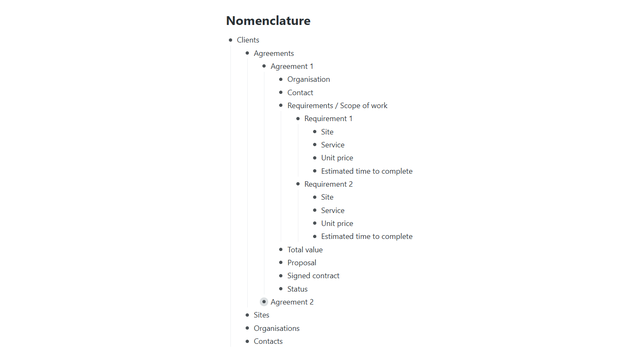 Information architecture
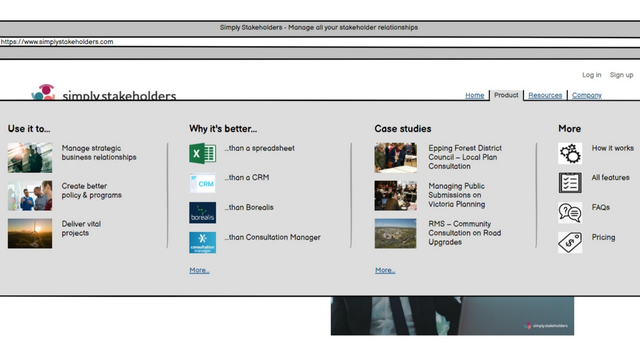 Navigation
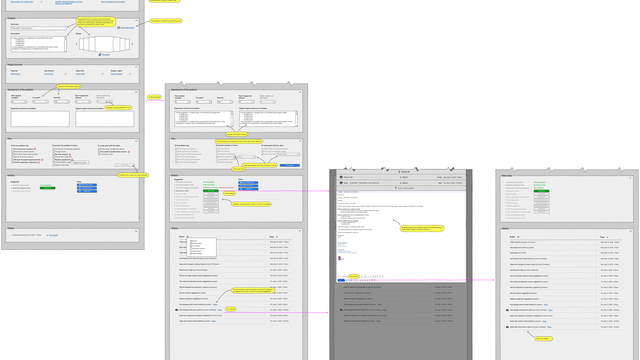 Wireframe
This step isn't about making things look pretty. That comes later. It's about making things user-friendly. Your product must:
- Allow users to achieve their goals
- Be clear, intuitive and easy to use
- Be enjoyable to use
- Be reliable and trustworthy
- Be consistent and fast
- Minimise user mistakes
- Help when they do make mistakes
- Not do anything unexpected
Ticking all these boxes is no easy task. For simple and generic things (like a text field), there's often a standard approach, which users have come to expect. But established conventions, best practices and publised usability studies will get you only so far when you're designing for a niche workflow.
In the end, the solution is almost always the result of empathy, experience and creativity. I keep my user hat on, I draw on past successes, and I let the solution unfold. It's a lot like writing, which I suppose explains why I took to it so naturally, all those years ago.
3. Test your design
There's no substitute for seeing representative users taking your product for a test-drive. It's a must.
But it has some pretty serious limitations:
- It's expensive if you use paid participants, and an approximation if you don't.
- It provides qualitative data only, nothing statistically significant.
- It often just confirms what you already knew.
- Watched users never truly behave naturally.
You should still do it though. The only decisions are paid or unpaid, when and how often. And budget dictates all the answers.
Most of my clients don't have the budget for paid testing, and that's fine. When you boil it down, free testing gets you about 80% of the way there. And when you're on a tight budget, the 80/20 rule is your best friend.
I have enough people around me that I can usually find a few fairly representative guinea pigs. You probably have some in-house too, and in your own circles. We may not be able to recruit people who are an exact match on all fronts, but we'll still get some great qualitative data.
UX is more template than blueprint
You may have noticed that I said, above, I wireframe only part of the user interface. That was deliberate. Wireframes are really only necessary for certain key elements.
I always create one that serves as a template (e.g. showing header, footer, left nav, top nav, logo, form and field standards, and so on).
Beyond that, I mostly use wireframes to solve sticky usability issues. When I know something could be challenging for users, I wire it up so I'm not trying to solve it in my imagination only (and so I have something to show my AI when it comes time to code it).
And it evolves during development
It's also important to note that the UX always evolves as the product is built. It's a feedback loop: development always surfaces unplanned oddities and subtle edge cases that require a rethink or some special attention.
In fact, in the real world, UX is more an ongoing activity — or a way of thinking — than a stage with a defined beginning and end.
I've been doing UX since 2009
In every role over the past 17+ years, I've done UX design on an almost daily basis.
User experience 2002 – present
-
PresentDigital Product ConsultantGlennMurray.com.au
-
2023 – 2026Director of Business SystemsMatthews Cleaning Co
-
2017 – 2023Customer Experience DirectorEaseware Technology
-
2017 – 2017Information Experience ManagerAppliances Online
-
2016 – 2017User Experience ManagerAppliances Online
-
2012 – 2016FounderBlurb Maker
-
2010 – 2020UX Design, Customer ExperienceSilver Pistol
-
2009 – 2010FounderHub Corporation
Need help with a digital product?
If you want someone with all the skills necessary to help everywhere you need it, please contact me.
Get in touch